Minggu, 14 November 2010
Apple MacBook/2.4GHz (Mid 2010)

MacBook/2.4GHz (Mid 2010)
Earlier this month, Apple quietly updated its entry-level laptop, the MacBook. Available in just one standard configuration, the new MacBook now sports a faster running processor and improved graphics that provide a modest speed improvement over its predecessor.
New to the MacBook is a 2.4GHz Intel Core 2 Duo, which takes the place of the 2.26GHz Intel Core 2 Duo used in the previous model (). An Nvidia GeForce 320m integrated graphics subsystem replaces the Nvidia GeForce 9400m integrated graphics.
The only other differences of note are the addition of inertial scrolling and the Mini DisplayPort now supports both audio and video out when using a compatible third-party adapter. These new features were added to the MacBook Pro models released in April.
The new MacBook’s appearance is identical to the mid-2009 model it replaces, using the same 13-inch glossy screen and white plastic unibody design. Also unchanged are the ports, with a Mini DisplayPort, two USB 2.0 ports, and a Gigabit Ethernet port—FireWire continues to be missing (and missed by me).
Like the older system, the new MacBook ships standard with 2GB of RAM, and Apple says that 4GB is the recommended maximum RAM configuration. In case you are wondering, the entire MacBook Pro line ships with 4GB of RAM standard, with a maximum configuration of 8GB. It’s possible to install 8GB of RAM in a MacBook and it would probably work just fine, but if something goes wrong, you’d be on your own. The included warranty and AppleCare won’t cover a MacBook with 8GB of RAM.
New 2.4GHz MacBook: Speedmark scores
Longer bars are better. Blue bars in italics represent reference systems. Macworld Lab testing by James Galbraith, Chris Holt, Chris Holt, Lynn La, and Meghann Myers.
To find out how much these enhancements affect performance, we ran the new MacBook through our Speedmark 6 suite of overall system tests. We found that the new MacBook, with a Speedmark 6 score of 118, was seven percent faster than the 2.26GHz MacBook it replaces.
By far, the biggest gain was in our 3D game tests, in which the new MacBook, with its Nvidia GeForce 320M graphics, was able to display 66 percent more frames per second than the older model with its Nvidia GeForce 9400M graphics. The new MacBook’s faster processor also helped it post a 10 percent faster Cinebench CPU score.
The new system was also faster in our Photoshop and iTunes tests, but only by a few seconds. Interestingly, some of the hard drive tests (file duplication and unzipping a 2GB file) were a couple of seconds faster on the older model.
Comparing the new $999 MacBook to the entry-level $1199 13-inch 2.4GHz Core 2 Duo MacBook Pro (), we see identical Speedmark scores. With the same hard drives, processors, and integrated graphics, this should come as little surprise. And though the $1199 MacBook Pro, with 4GB of RAM, includes twice the memory of the MacBook, our Speedmark tests (run one at a time) show very little benefit from the additional RAM. I ran Speedmark on the 2.26GHz MacBook with 4GB of RAM for our recent review of the 13-inch MacBook Pros and found only a 2-point increase in Speedmark scores with the additional memory. So why go Pro? There are a couple of advantages to the MacBook Pro, namely FireWire 800 and an SD card slot.
Looking at the performance differences between the MacBook and the low-end 15-inch MacBook Pro (), a $1799 model with 4GB of RAM, both integrated and discreet graphics, and a 2.4GHz Intel Core i5 processor, we see a much bigger gap—24 percent overall, according to Speedmark 6 results. The Core i5 MacBook Pro, with its Hyper-Threading and Turbo Boost technologies, was 32 percent faster than the MacBook in the Cinebench CPU test, 45 percent faster in MathematicaMark and 34 percent faster in our Aperture test. The 15-inch MacBook Pro’s discreet graphics was able to display nearly twice the number of frames per second as the new MacBook with only integrated graphics.
2.4GHz MacBook Pro Speedmark scores
Speedmark
6 Adobe
Photoshop
CS4 Cinebench
R10 Mathemetica-
Mark 7 Compressor
3.0.4 Aperture
2.1.4 iMovie
’09 iMovie
’09 iTunes
9 Call of
Duty 4 Finder Finder Finder Parallels
WorldBench 6 Handbrake
0.9.3 iPhoto
’09 Pages
’09 Battery
Life
OVERALL
SCORE SUITE RENDER SCORE MPEG
ENCODE IMPORT IMPORT
ARCHIVE EXPORT MP3
ENCODE FRAME
RATE DUPLICATE
1GB
FOLDER ZIP
ARCHIVE UNZIP
ARCHIVE MULTI-TASK
TEST RIP
DVD
CHAPTER IMPORT OPEN
WORD
DOCUMENT VIDEO
PLAYBACK
MacBook
2.4GHz Core 2 Duo 118 0:48 2:58 3.39 10:20 3:38 1:47 1:58 1:37 35.6 0:35 4:07 1:18 6:21 3:15 0:55 2:05 4:55
MacBook
2.26GHz Core 2 Duo (Late 2009) 110 0:50 3:05 3.13 10:39 3:49 2:09 2:07 1:39 21.5 0:32 4:11 1:14 6:30 3:12 1:00 2:26 3:58
13-inch MacBook Pro
2.4GHz Core 2 Duo 118 0:48 2:57 3.41 11:11 3:41 1:46 2:00 1:41 38.9 0:32 4:03 1:14 6:23 3:14 0:48 2:02 4:19
15-inch MacBook Pro
2.4GHz Core i5 146 0:43 2:02 4.93 8:35 2:22 1:28 1:35 1:20 68.4 0:32 3:37 1:12 5:56 2:39 0:43 1:35 4:33
Best results in bold. Reference systems in italics.
How we tested. Call of Duty score is in frames per second (higher is better). Speedmark and MathematicaMark are performance scores (higher scores are better). All others are in minutes:seconds (lower is better, except for Battery Life, where higher is better). All systems were tested with 10.6.3 and 4GB RAM. The Photoshop Suite test is a set of 14 scripted tasks using a 50MB file. Photoshop’s memory was set to 70 percent and History was set to Minimum. We recorded how long it took to render a scene with mulitprocessors in CinemaBench. We used Compressor to encode a MOV file to the application’s H.264 for video podcast setting.We timed the import and thumbnail/preview creation time for 150 photos. In iMovie, we imported a camera archive and exported it to iTunes for Mobile Devices setting. We converted 90 minutes of AAC audio files to MP3 using iTunes’ High Quality setting. We Unzipped a 2GB archive in the Finder. We ran WorldBench 6 multitasking test on a Parallels VM. We imported 150 JPEGs into iPhoto. We used HandBrake to rip a DVD chapter to the hard drive. We opened a 500-page Word document in Pages ’09.—Macworld Lab testing by James Galbraith, Chris Holt, Lynn La, and Meghann Myers
Battery life
With the new graphics and some minor changes to the battery, the new MacBook can last longer between charging cycles. In our tests, where we loop a movie from the hard drive at full screen, full brightness with AirPort connected to our local network and the volume on (but low), the MacBook was able to run for nearly 5 hours, or 58 minutes longer than the MacBook it replaces. It lasted 35 minutes longer than the 13-inch MacBook Pro and 22 minutes longer than the 15-inch MacBook Pro.
Note that our battery tests (and therefore, the results) differ significantly from those cited in Apple’s marketing materials.
Limited options
Apple offers a very limited number of optional upgrades for the MacBook. Upping the RAM to 4GB from 2GB will cost $100, and swapping the 250GB, 5400-rpm hard drive for a 320GB drive of the same speed will cost $50; a 500GB drive adds $150 to the price. Faster hard drives, SSDs, or an anti-glare screen are not offered through the Apple Store.
Macworld buying advice
With its faster processor, improved graphics and longer battery life, the MacBook makes an attractive option for budget conscious laptop shoppers. Performance-wise, the MacBook isn’t different from the 13-inch 2.4GHz Core 2 Duo MacBook Pro—the extra $200 for the MacBook Pro buys more RAM, a FireWire 800 port, an SD card slot, an an aluminum case.
20.50 0
Intel, Google Asked to Help Revise EU Data Protection Laws
The European Commission has set up an advisory panel including executives from Google and Intel to help it revise European Union laws on data protection.
"The aim of the group is to identify issues and challenges raised by new technologies. We are not reviewing the main data protection laws at present, but this could be a first step," said European Commission spokesman Michele Cercone.
He added that the executives were chosen in a private capacity, rather than as representatives of their companies.
Peter Fleischer, Google global privacy counsel, along with David Hoffman, Intel's group counsel for eBusiness and privacy will sit alongside data protection lawyers and regulators on the panel, which held its inaugural meeting Thursday.
"I am delighted to have been asked," Fleischer told journalists.
Many aspects of the existing E.U. legislation have been made obsolete by advances in technology, Fleischer said, referring to the E.U.'s cornerstone law, the 1995 data protection directive.
He will urge the Commission to adopt a system where companies only have to deal with one national data protection authority, instead of having to meet the demands of all 27, as they do at present.
"There is a need for harmonization of data protection enforcement in Europe," he said, adding that a system of mutual recognition among national authorities will go a long way in achieving that aim.
He also will try to persuade the Commission to move away from a location-based approach. "It worked when data was stored on paper, but with the Internet that concept is obsolete because data travels around the world and is commonly stored in many different locations at once. There is a strong need for data protection laws to take the new technology into consideration," Fleischer said.
He pointed to Canada's approach, which is not location-based, but calls on data controllers, such as companies, to be responsible for data safety.
Finally, he wants data protection laws to apply to public institutions as well as to private companies, pointing out that some of the most serious threats' to potential threats to people's data and their privacy are posed by governments, not corporations. The 1995 law only applies to the private sector.
Privacy campaign groups are critical of Google's own approach to privacy. However, none were available to comment.
"The aim of the group is to identify issues and challenges raised by new technologies. We are not reviewing the main data protection laws at present, but this could be a first step," said European Commission spokesman Michele Cercone.
He added that the executives were chosen in a private capacity, rather than as representatives of their companies.
Peter Fleischer, Google global privacy counsel, along with David Hoffman, Intel's group counsel for eBusiness and privacy will sit alongside data protection lawyers and regulators on the panel, which held its inaugural meeting Thursday.
"I am delighted to have been asked," Fleischer told journalists.
Many aspects of the existing E.U. legislation have been made obsolete by advances in technology, Fleischer said, referring to the E.U.'s cornerstone law, the 1995 data protection directive.
He will urge the Commission to adopt a system where companies only have to deal with one national data protection authority, instead of having to meet the demands of all 27, as they do at present.
"There is a need for harmonization of data protection enforcement in Europe," he said, adding that a system of mutual recognition among national authorities will go a long way in achieving that aim.
He also will try to persuade the Commission to move away from a location-based approach. "It worked when data was stored on paper, but with the Internet that concept is obsolete because data travels around the world and is commonly stored in many different locations at once. There is a strong need for data protection laws to take the new technology into consideration," Fleischer said.
He pointed to Canada's approach, which is not location-based, but calls on data controllers, such as companies, to be responsible for data safety.
Finally, he wants data protection laws to apply to public institutions as well as to private companies, pointing out that some of the most serious threats' to potential threats to people's data and their privacy are posed by governments, not corporations. The 1995 law only applies to the private sector.
Privacy campaign groups are critical of Google's own approach to privacy. However, none were available to comment.
20.42 0
11- and 13-inch MacBook Air (Late 2010)
You can forgive Steve Jobs for a bit of hyperbole when he’s on stage introducing new products to an audience of thousands of people following along via a live video stream and countless liveblogs. “It’s like nothing we’ve ever created before,” Jobs said when introducing the new MacBook Air. “We think it’s the future of notebooks.”
 Jobs is certainly dead-on when he suggests that the future of notebooks is in ever-slimmer, lighter laptops featuring flash storage. But is the new MacBook Air like nothing Apple has created before? Not really. The 13.3-inch model is basically an improved version of the previous MacBook Air (), albeit at a better price.
The new 11.6-inch MacBook Air, on the other hand, is the smallest and lightest Apple laptop of all time, and its base price of $999 ties it with the plastic MacBook () as the cheapest Mac laptop available. I’m not sure I’d call it unlike anything Apple’s created before—it’s got all the stylings of the MacBook Air and MacBook Pro lines, but is tiny like the legendary 12-inch PowerBook of old—but it might be the most novel new Mac released since the Intel Mac era began.
The display piece of the laptop is extremely thin, but the aluminum shell means it’s fairly rigid. Certainly it doesn’t feel fragile or flimsy. And a new hinge design means you can now open the display at a wider angle than previous Airs.
The bottom half makes up the bulk of the laptop, and this is where Apple definitely made some changes compared to earlier MacBook Airs. The older Airs had curved edges all around, a choice that forced the design of a drop-down door to expose the laptop’s headphone, display, and USB ports. These new Airs have flat sides and a slightly curved bottom. The result is that when you pick one up, it feels a bit chunkier than the older models, even though it’s really not.
 By trading off that illusion of extra thinness, Apple gets to ditch the drop-down door and station ports right on the sides of the laptops. On the left side, there’s a MagSafe connector, USB 2.0 port, headphone jack, and a built-in microphone. On the right, there’s a Mini DisplayPort, another USB 2.0 port, and (on the 13-inch model only) an SD card slot.
 The second USB port addresses one of the previous Air models’ major shortcomings: its single USB port could get crowded in a hurry, especially if you needed to perform a task with two separate USB devices at once and forgot to bring a hub along. (In addition to the continued lack of FireWire support on these models, they also continue to lack an Ethernet port. Apple does offer a $29 USB Ethernet Adapter if you need to get on a wired network. And of course, the Air doesn't come with any optical drive.)
These small laptops can drive large displays via that Mini DisplayPort, at resolutions up to 2560 by 1600—meaning they’ll even drive Apple’s 27-inch LED Cinema Display. (The Apple display’s included MagSafe and Mini DisplayPort cables will stretch to reach those ports, which are situated on opposite sides of the MacBook Air—but just barely.) Both models are driven by a nVidia GeForce 320M graphics processor (the same one used in the 13-inch MacBook Pro), and it’s a nice step up from the nVidia GeForce 9400 used in previous Airs; the new models showed off much improved graphics performance compared to their predecessors.
One nice touch for users upgrading from a past MacBook Air model: if you’ve got a set of iPhone-compatible headphones with an inline microphone and remote, this generation of Airs will let you use that mic for audio input, and you can even use the button(s) for controlling music playback.
Though many small laptops in the PC world feature shrunken-down keyboards that deviate from the standard keyboard layout in unpleasant ways, Apple has refused to compromise on this point—even on the 11-inch MacBook Air. Both models sport the same full-sized keyboard that Apple uses in all its other laptops, not to mention its USB and wireless external keyboards. The only real difference is on the top row of keys: they’re shorter than on the other keyboards, and the power button now appears as the rightmost key in that row. Typing on the keyboard feels exactly as it does on all those other keyboards, too; the thinness of the Air doesn’t mean there’s any less key travel. If you like typing on a MacBook keyboard (or Apple’s external keyboards), you’ll like typing on the MacBook Air.

Keyboard and trackpad of the 11-inch (left) and 13-inch MacBook Air.One place where this new set of MacBooks regresses from the previous generation: keyboard backlighting is gone. I never considered keyboard backlighting an essential feature—I do know where all the keys are. Like heated seats in a car, it’s a feature that was occasionally useful and felt vaguely luxurious, and I’ll miss it. Also gone are the sleep light and the infrared port.
 On the positive side, though, the Airs have finally inherited the same glass-trackpad technology that was added to the MacBook Pro two years ago. It looks, feels, and works just like you’d expect. Though the Air is only .11 inches thick at the same edge that contains the trackpad, the trackpad still depresses with a satisfying click. (The trackpad on the 11-inch model is slightly less tall, but otherwise the two trackpads are identical.)
Finally, one of the lamest features of the MacBook Air was its single mono speaker stuck under the right side of the keyboard. Good news, everyone: The new Air has stereo speakers nestled under the left and right sides of the keyboard. They’re never going to win any awards, but they sound vastly better than the old model.
Flash storage has several advantages over hard drives. They tend to be faster than hard drives, especially at reading data. (Though performance can vary widely, the flash storage on these new MacBook Air models was way faster than the poky 4200-rpm hard drives on the prior generation of MacBook Air.) Because they’ve got no moving parts, there’s little risk that dropping your laptop will cause physical damage to flash storage—a real concern when it comes to a spinning hard drive. Flash-storage drives can use less power, extending battery life. They are silent. And despite the amazing miniaturization that’s gone on in the hard-drive market, flash storage takes up a whole lot less space than a hard drive. (At least, it does if it hasn’t been inserted into a traditional hard-drive enclosure—a backward-compatibility trick Apple had to do with the previous version of the Air, but has avoided with this revision.)
There are also some disadvantages to flash storage. It’s more expensive than traditional hard drives, though prices are falling rapidly. There are also questions about ongoing performance of flash storage—depending on the type of flash storage you use, you could find that after several months of heavy use it’s dramatically slower than it was when you bought it.
In any event, if you get a new MacBook Air you’ll be getting it with flash storage. Because of the expense of solid-state technology, the disk capacities for these systems are much lower than they’d be in a bigger system with a spinning hard drive. The $999 base-model 11-inch MacBook Air is the most extreme of these: it comes with 64GB of flash storage. (It’s a $200 upgrade to move up to 128GB.) The 13-inch models come in 128GB and 256GB flash-storage configurations.
At 128GB and certainly at 256GB, you’ll find the MacBook Air’s storage space perfectly acceptable, especially if you’re only using these systems as a secondary computer. (If you’re planning on editing HD video on them, I suspect the lack of storage space will be no more of a problem than the slow clock speed of the Core 2 Duo processor.) The 64GB model, on the other hand, will be a tight fit. You can do it, but you’ll need to carefully pick which apps you want to install and make good use of file servers, or just embrace shuttling files on and off it via a syncing service such as Dropbox. Also, I’d suggest you keep your music collection on a server or just use the music in that iPod or iPhone in your pocket, rather than loading big media files on such a tiny drive.
 The new 13-inch MacBook Air isn’t a radical departure from the previous-generation Air, which was itself a surprisingly thin and light laptop compared to Apple’s other MacBook and MacBook Pro models. The new Air is almost imperceptibly thinner (0.05 inches thinner at its thinnest point, 0.08 inches thinner at its thickest), has exactly the same width and depth, and weighs just 40 grams (1.4 ounces) less. The keyboard’s the same, and while the glass trackpad is new, it takes up the same space as the old Air’s trackpad-and-button combo.
Beyond the physical changes to the case, the extra USB port, and the upgraded video processor, perhaps the biggest hardware change to the 13-inch Air from the previous model is the screen itself: the old model was 1280 by 800 pixels, while the new one is 1440 by 900 pixels—all in the same physical space. The result is that everything looks a little bit smaller, but you’ve got more room for stuff on the screen. I found that after a few minutes using the new display, I was used to the change in resolution, though I did increase the default font size in a few of my apps just to take it easy on my eyes.
 From a financial perspective, the 13-inch Air is a much better deal than any previous MacBook Air model. The base model, priced at $1299, features a 1.86GHz Intel Core 2 Duo processor and 128GB of flash storage. That’s $200 less than the previous base-model Air, where $1499 got you the same processor, a 120GB physical hard drive, and inferior graphics performance. The stock high-end model, with the same specs as the low-end model save 256GB of flash storage, is similarly $200 less than the previous stock high-end system. (Though that $1799 system came with a 2.13GHz Core 2 Duo processor, it also had only 128GB of flash storage.)
 This is not to say that $1599 is all you can spend on the 13-inch MacBook Air. Apple has provided several options for those who want to trick this system out: for $100 you can add a 2.13GHz Core 2 Duo processor (to the high-end configuration only), and either configuration can be upgraded from 2GB to 4GB of RAM for $100. (And you can only make these upgrades when you order the product; none of these features is upgradable after the fact, either by you or your local Apple Genius.) Even with those two additions, at $1799 you’d be getting a majorly upgraded system from the MacBook Air offered by Apple previously. In our Macworld Lab testing, we found that the 1.86GHz 13-inch MacBook Air was slightly faster overall than a current-model 13-inch 2.4GHz Core 2 Duo MacBook Pro. However, our Speedmark 6.5 score is based on a suite of tests, and the individual tests were all over the map. The Air, powered by its flash storage, excelled on our storage-based tests. Powered by the nVidia GeForce 320M graphics processor, it held its own on graphics-related tests, but our calculation-intensive tests showed the effects of its processor’s slower clock speed.
The 13-inch Air also easily outdistanced previous models of MacBook Air, aided by its fast storage and upgraded graphics. Not only is this new MacBook Air the fastest Air ever made, it’s roughly comparable in speed to the other two current 13-inch Mac laptop models. That’s a first for the MacBook Air product line.
 I love small Mac laptops. The smaller, the better. That’s why I embraced the 12-inch PowerBook in its heyday. But the 11-inch MacBook Air puts even that legendarily small Mac to shame: it trades an inch of depth for an inch of width, weighs in at half the PowerBook’s weight, and is a full half-inch thinner than the old paragon of tiny Apple laptops. Yes, there’s a new champion of Mac laptop smallness, and it’s the 11-inch MacBook Air.
The 11-inch Air is only 11.8 inches wide (a full inch narrower than the 13-inch model), 7.56 inches deep (1.4 inches less deep), and a scant 2.3 pounds (nine ounces lighter). Apple’s $999 white MacBook weighs more than twice as much! The original MacBook Air made all the other MacBooks in Apple’s product line feel like boat anchors; the 11-inch MacBook Air makes the 13-inch Air feel heavy. It’s a little bit crazy.
 But while the 11-inch Air is small and light, it doesn’t feel cramped. Part of that is due to the high-resolution display, which packs more pixels into its compact 11.6-inch diagonal screen than fit on the screen of that 13-inch white MacBook. Sporting a 16:9 aspect ratio (1366 by 768 pixels), it’s a bit wider than most Apple laptop displays, and 768 pixels is the bare minimum number of vertical pixels you’d want in a modern Mac display. However, most modern Mac software has been designed with widescreen aspect ratios in mind—and the extra width of the 16:9 display is what keeps it from not feeling cramped.
 Like the 13-inch Air, the 11-inch model managed to fit a lot of pixels into a small area of physical space, meaning it’s got a higher-resolution display than most other MacBooks. (It’s actually more comparable to the screen resolution of an iPad.) Because the Mac OS X interface isn’t independent of screen resolution, the result is that everything on the MacBook Air’s screen seems a little bit smaller than it does on most other Macs. As with using the 13-inch model, I adjusted to the new resolution within a few hours, with the exception of changing a few default font sizes and finding myself pressing Command-plus in Safari a bit more often to increase the size of Web pages. When the MacBook Air was first introduced in 2008, it was criticized for its high price: $1799 to start, with a $1000(!) 64GB flash storage option. Over the past two years Apple has made some progress in turning the Air into a more affordable computer, but with the 11-inch model the company has made a breakthrough. The base-model 11-inch Air costs $999, the same price as the previous low-price laptop leader, the white MacBook. Granted, for $999 you only get a 1.4GHz Core 2 Duo processor and 64GB or flash storage—but unless you’re shopping for a desktop-replacement system that’ll do heavy-duty video and audio editing, I’m not sure it matters.
For an extra $200, Apple’s offering the 11-inch Air with 128GB of flash storage. While both models can be factory-upgraded from the stock 2GB of RAM to 4GB for $100, only the 128GB model can be upgraded to a 1.6GHz Core 2 Duo for an additional $100. A fully stocked 11-inch MacBook Air— complete with 128GB of flash storage, 4GB of RAM, and a 1.6GHz processor—would cost $1399. Not dirt cheap, but still less than the base model of the last-generation Air. (And yes, for that price you could also get a 13-inch Air with the same RAM and storage and a 1.8 GHz processor—but it would be bigger and heavier than the 11-inch Air, now, wouldn’t it?)
Based on our Macworld Lab tests, the 11-inch MacBook Air performs about how you’d expect: It’s the slowest currently-shipping Mac laptop, but it’s still quite a bit faster than the previous generation of MacBook Air models. That’s primarily because of the new nVidia GeForce 320M graphics processor, which makes these systems blow the old Airs out of the water on all our graphics tests. But despite that graphics processor and speedy flash storage, the fact remains that the 11-inch MacBook’s processor is a 1.4GHz Core 2 Duo processor, so it’s running at a clock speed far below those found on other current Macs.
Now that I’ve declared the 11-inch MacBook Air the slowest Mac in Apple’s product line, let me explain to you why I don’t think it matters. If you’re using the Web, writing e-mail or articles or novels, and other relatively lightweight tasks, you’ll find the MacBook Air plenty fast. I could even run Photoshop CS4 on it, editing relatively lightweight Web-resolution graphics, without much trouble. If you’re planning on using it to edit multitrack audio or complex HD video projects, though, you are probably setting yourself up for disappointment.
I tried to watch some video on this model—typically a major MacBook Air bugaboo. I was able to stream an episode of Terriers from Hulu without incident. The episode played without getting all jumpy and dropping frames (a typical symptom of an overheated and struggling MacBook Air in the past). The Air definitely heated up when the video was playing, and its fan kicked in—though honestly, I had to almost place my ear against the back hinge before I could actually hear it. Playing H.264 video was much smoother than I’ve experienced on prior Air models as well—again, presumably because of the GeForce 320M graphics processor.

Longer bars are better. Blue bars in italics represent reference systems. Macworld Lab testing by James Galbraith, William Wong, Gil Loyola, and McKinley Noble.
Apple says that by reducing the space of other components (such as the solid-state drive enclosure) in these models, it’s been able to increase the amount of room left for batteries, with the result being improved battery life. Apple claims that the 11-inch Air can last up to five hours when running the company’s own “wireless productivity” test suite; its claims for the 13-inch Air are up to seven hours.
Our own tests are more aggressive than Apple’s, and are designed to drain the laptop’s battery much faster than Apple’s. But they do give us a good sense of how much battery power these systems have when compared to the previous-generation MacBook Air. And there’s good news on that front: The 11-inch Air lasted for 220 minutes while looping an H.264 movie in full-screen mode at full brightness. The new 13-inch Air lasted 265 minutes. And the 2009-era MacBook Air? It only lasted about 185 minutes.
In real-world use, I found that the 11-inch MacBook’s battery definitely felt more long-lasting than the previous-generation Air’s. It’s probably not powerful enough to last the entire day, but it’s going to give you a good, solid run. The 13-inch model, on the other hand, can probably get you through an entire workday if you’re judicious with your power usage and put it to sleep when appropriate.

The new 11.6-inch MacBook Air, on the other hand, is the smallest and lightest Apple laptop of all time, and its base price of $999 ties it with the plastic MacBook () as the cheapest Mac laptop available. I’m not sure I’d call it unlike anything Apple’s created before—it’s got all the stylings of the MacBook Air and MacBook Pro lines, but is tiny like the legendary 12-inch PowerBook of old—but it might be the most novel new Mac released since the Intel Mac era began.
Common bonds
The 11-inch and 13-inch MacBook Air models have a lot in common. They keep their displays in a rigid aluminum shell with an aluminum bezel around a LED-backlit glossy screen. (Unlike the MacBook Pro models, which feature a single slab of glass across the entire front of the display, the MacBook Air continues to feature an ultra-thin glass layer located behind the bezel. In my experience, displays with this approach are less prone to cause glare than screens such as those on the MacBook Pro models.) Like every other Mac laptop, there’s a tiny Webcam located immediately above the display. (In some press materials Apple refers to this camera, once called iSight, as a “FaceTime camera,” though in System Preferences it’s still called an iSight.)The display piece of the laptop is extremely thin, but the aluminum shell means it’s fairly rigid. Certainly it doesn’t feel fragile or flimsy. And a new hinge design means you can now open the display at a wider angle than previous Airs.
The bottom half makes up the bulk of the laptop, and this is where Apple definitely made some changes compared to earlier MacBook Airs. The older Airs had curved edges all around, a choice that forced the design of a drop-down door to expose the laptop’s headphone, display, and USB ports. These new Airs have flat sides and a slightly curved bottom. The result is that when you pick one up, it feels a bit chunkier than the older models, even though it’s really not.
These small laptops can drive large displays via that Mini DisplayPort, at resolutions up to 2560 by 1600—meaning they’ll even drive Apple’s 27-inch LED Cinema Display. (The Apple display’s included MagSafe and Mini DisplayPort cables will stretch to reach those ports, which are situated on opposite sides of the MacBook Air—but just barely.) Both models are driven by a nVidia GeForce 320M graphics processor (the same one used in the 13-inch MacBook Pro), and it’s a nice step up from the nVidia GeForce 9400 used in previous Airs; the new models showed off much improved graphics performance compared to their predecessors.
One nice touch for users upgrading from a past MacBook Air model: if you’ve got a set of iPhone-compatible headphones with an inline microphone and remote, this generation of Airs will let you use that mic for audio input, and you can even use the button(s) for controlling music playback.
Though many small laptops in the PC world feature shrunken-down keyboards that deviate from the standard keyboard layout in unpleasant ways, Apple has refused to compromise on this point—even on the 11-inch MacBook Air. Both models sport the same full-sized keyboard that Apple uses in all its other laptops, not to mention its USB and wireless external keyboards. The only real difference is on the top row of keys: they’re shorter than on the other keyboards, and the power button now appears as the rightmost key in that row. Typing on the keyboard feels exactly as it does on all those other keyboards, too; the thinness of the Air doesn’t mean there’s any less key travel. If you like typing on a MacBook keyboard (or Apple’s external keyboards), you’ll like typing on the MacBook Air.
Keyboard and trackpad of the 11-inch (left) and 13-inch MacBook Air.
Finally, one of the lamest features of the MacBook Air was its single mono speaker stuck under the right side of the keyboard. Good news, everyone: The new Air has stereo speakers nestled under the left and right sides of the keyboard. They’re never going to win any awards, but they sound vastly better than the old model.
Flash storage, for sure
The original MacBook Air was the first Mac system to be sold with a flash-storage drive as an optional component, and in these new models all storage takes place on flash storage. In case you’re not familiar with the concept, flash storage is a hard-drive replacement that stores data on fixed memory chips (just like the iPhone, iPad and all iPods except the classic) instead of on spinning platters (like most of the computers out there today).Flash storage has several advantages over hard drives. They tend to be faster than hard drives, especially at reading data. (Though performance can vary widely, the flash storage on these new MacBook Air models was way faster than the poky 4200-rpm hard drives on the prior generation of MacBook Air.) Because they’ve got no moving parts, there’s little risk that dropping your laptop will cause physical damage to flash storage—a real concern when it comes to a spinning hard drive. Flash-storage drives can use less power, extending battery life. They are silent. And despite the amazing miniaturization that’s gone on in the hard-drive market, flash storage takes up a whole lot less space than a hard drive. (At least, it does if it hasn’t been inserted into a traditional hard-drive enclosure—a backward-compatibility trick Apple had to do with the previous version of the Air, but has avoided with this revision.)
There are also some disadvantages to flash storage. It’s more expensive than traditional hard drives, though prices are falling rapidly. There are also questions about ongoing performance of flash storage—depending on the type of flash storage you use, you could find that after several months of heavy use it’s dramatically slower than it was when you bought it.
In any event, if you get a new MacBook Air you’ll be getting it with flash storage. Because of the expense of solid-state technology, the disk capacities for these systems are much lower than they’d be in a bigger system with a spinning hard drive. The $999 base-model 11-inch MacBook Air is the most extreme of these: it comes with 64GB of flash storage. (It’s a $200 upgrade to move up to 128GB.) The 13-inch models come in 128GB and 256GB flash-storage configurations.
At 128GB and certainly at 256GB, you’ll find the MacBook Air’s storage space perfectly acceptable, especially if you’re only using these systems as a secondary computer. (If you’re planning on editing HD video on them, I suspect the lack of storage space will be no more of a problem than the slow clock speed of the Core 2 Duo processor.) The 64GB model, on the other hand, will be a tight fit. You can do it, but you’ll need to carefully pick which apps you want to install and make good use of file servers, or just embrace shuttling files on and off it via a syncing service such as Dropbox. Also, I’d suggest you keep your music collection on a server or just use the music in that iPod or iPhone in your pocket, rather than loading big media files on such a tiny drive.
The 13-inch model
Beyond the physical changes to the case, the extra USB port, and the upgraded video processor, perhaps the biggest hardware change to the 13-inch Air from the previous model is the screen itself: the old model was 1280 by 800 pixels, while the new one is 1440 by 900 pixels—all in the same physical space. The result is that everything looks a little bit smaller, but you’ve got more room for stuff on the screen. I found that after a few minutes using the new display, I was used to the change in resolution, though I did increase the default font size in a few of my apps just to take it easy on my eyes.
The 13-inch Air also easily outdistanced previous models of MacBook Air, aided by its fast storage and upgraded graphics. Not only is this new MacBook Air the fastest Air ever made, it’s roughly comparable in speed to the other two current 13-inch Mac laptop models. That’s a first for the MacBook Air product line.
The 11-inch model
The 11-inch Air is only 11.8 inches wide (a full inch narrower than the 13-inch model), 7.56 inches deep (1.4 inches less deep), and a scant 2.3 pounds (nine ounces lighter). Apple’s $999 white MacBook weighs more than twice as much! The original MacBook Air made all the other MacBooks in Apple’s product line feel like boat anchors; the 11-inch MacBook Air makes the 13-inch Air feel heavy. It’s a little bit crazy.
For an extra $200, Apple’s offering the 11-inch Air with 128GB of flash storage. While both models can be factory-upgraded from the stock 2GB of RAM to 4GB for $100, only the 128GB model can be upgraded to a 1.6GHz Core 2 Duo for an additional $100. A fully stocked 11-inch MacBook Air— complete with 128GB of flash storage, 4GB of RAM, and a 1.6GHz processor—would cost $1399. Not dirt cheap, but still less than the base model of the last-generation Air. (And yes, for that price you could also get a 13-inch Air with the same RAM and storage and a 1.8 GHz processor—but it would be bigger and heavier than the 11-inch Air, now, wouldn’t it?)
Based on our Macworld Lab tests, the 11-inch MacBook Air performs about how you’d expect: It’s the slowest currently-shipping Mac laptop, but it’s still quite a bit faster than the previous generation of MacBook Air models. That’s primarily because of the new nVidia GeForce 320M graphics processor, which makes these systems blow the old Airs out of the water on all our graphics tests. But despite that graphics processor and speedy flash storage, the fact remains that the 11-inch MacBook’s processor is a 1.4GHz Core 2 Duo processor, so it’s running at a clock speed far below those found on other current Macs.
Now that I’ve declared the 11-inch MacBook Air the slowest Mac in Apple’s product line, let me explain to you why I don’t think it matters. If you’re using the Web, writing e-mail or articles or novels, and other relatively lightweight tasks, you’ll find the MacBook Air plenty fast. I could even run Photoshop CS4 on it, editing relatively lightweight Web-resolution graphics, without much trouble. If you’re planning on using it to edit multitrack audio or complex HD video projects, though, you are probably setting yourself up for disappointment.
I tried to watch some video on this model—typically a major MacBook Air bugaboo. I was able to stream an episode of Terriers from Hulu without incident. The episode played without getting all jumpy and dropping frames (a typical symptom of an overheated and struggling MacBook Air in the past). The Air definitely heated up when the video was playing, and its fan kicked in—though honestly, I had to almost place my ear against the back hinge before I could actually hear it. Playing H.264 video was much smoother than I’ve experienced on prior Air models as well—again, presumably because of the GeForce 320M graphics processor.
11- and 13-inch MacBook Air: Speedmark 6 scores
Longer bars are better. Blue bars in italics represent reference systems. Macworld Lab testing by James Galbraith, William Wong, Gil Loyola, and McKinley Noble.
Batteries and sleep
Apple is making a big deal about saying that these new MacBook Airs have “instant on” technology. What the company is talking about is a new power-saving mode: After a laptop’s asleep for a while, it switches into a super power-saving standby mode that lets the battery survive for up to 30 days. But when you open the laptop back up, it doesn’t show you a progress bar while it loads stuff—it just snaps back to life. Unfortunately, I couldn’t test Apple’s claim of 30 days of standby survival, since as of this writing these laptops have only been in our hands for five days.Apple says that by reducing the space of other components (such as the solid-state drive enclosure) in these models, it’s been able to increase the amount of room left for batteries, with the result being improved battery life. Apple claims that the 11-inch Air can last up to five hours when running the company’s own “wireless productivity” test suite; its claims for the 13-inch Air are up to seven hours.
Our own tests are more aggressive than Apple’s, and are designed to drain the laptop’s battery much faster than Apple’s. But they do give us a good sense of how much battery power these systems have when compared to the previous-generation MacBook Air. And there’s good news on that front: The 11-inch Air lasted for 220 minutes while looping an H.264 movie in full-screen mode at full brightness. The new 13-inch Air lasted 265 minutes. And the 2009-era MacBook Air? It only lasted about 185 minutes.
In real-world use, I found that the 11-inch MacBook’s battery definitely felt more long-lasting than the previous-generation Air’s. It’s probably not powerful enough to last the entire day, but it’s going to give you a good, solid run. The 13-inch model, on the other hand, can probably get you through an entire workday if you’re judicious with your power usage and put it to sleep when appropriate.
20.32 0
Acer Crams a Core i7 Into its New TimelineX Ultraportable
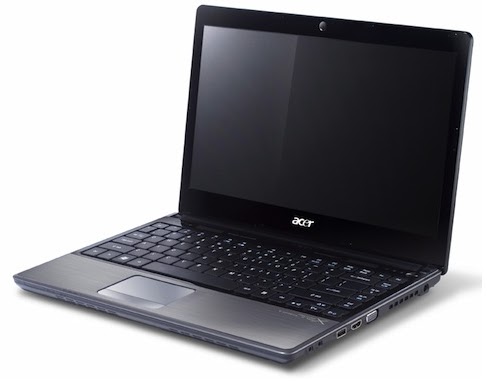 It's only been a few short months since Acer revealed its sleek, ultraportable Aspire TimelineX series, but the series is already getting an update. Acer just announced that it has updated the series, with a couple of new models and configurations.
A new model shines in the 1830T line--the 1830T-68U118, which features an Intel Core i7 680UM processor (1.46GHz with Turbo Boost technology), and 11.6-inch display, and a (supposed) 8 hours of battery life. The new model also lives up to its ultraportable classification, weighing in at just 3.09 lbs. This new ultra-light notebook has a suggested price of $899.
Acer updated the other TimelineX models as well: New features include HDMI output ports, Intel Core i3, i5, and i7 processors, full-sized keyboards (including the 11.6-incher), and Windows Home Premium. A couple of the 14-inch notebooks even have discrete graphics.
If you're looking for something a little closer to notebook instead of netbook, Acer is updating its 3820T line--13.3-inch screens, 3.97 pounds, and just over an inch (1.14 inches) thick. The 3820T line features Intel Core i3 or i5 processors, 4GB of RAM (upgradeable to 8GB), and up to a 320GB hard drive.
The Aspire 5820T (15.6-inch screens, 5.5 lbs) and 4820T (14-inch screens, 4.65 lbs) have been updated to include Intel Core i3 or i5 processors, up to 4GB of RAM (upgradeable to 8GB), and hard drives up to 500GB in capacity. Both lines will set you back $700+.
Also--for gamers--a couple of the 14-inch (4820TG) models now have discrete switchable graphics in an ATI Mobility Radeon HD 5650 graphics card. These models, which feature an Intel Core i5-460M processor, have a suggested retail price starting at $799.
While we're a bit skeptical about the "8-hour battery life" claim on all of these models, an 11.6-incher with a full-size keyboard and an i7 processor is certainly tempting.
20.12 0
Acer Aspire TimelineX 1830T-68U118: The Power You Crave in an Ultraportable Package
we mentioned that Acer was planning to update its TimelineX series by cramming an Intel Core i7 processor into an 11.6-inch ultraportable laptop. Well, the company succeeded. The Acer Aspire TimelineX 1830T-68U118 packs a ton of processing power into a netbook-size package, and still manages to include a full-size keyboard.

Our review model ($899 as of November 11, 2010) came with a powerful Core i7 processor--a 1.47GHz, ultra-low-voltage variant of the 680UM processor--as well as 4GB of RAM, a 500GB hard drive, and the 64-bit version of Windows 7 Home Premium. Connectivity features included an ethernet port, Wi-Fi, and Bluetooth--but no mobile broadband. You do get an embedded 1.3-megapixel Webcam.
Though not quite as sexy as the new 11-inch Macbook Air, the TimelineX is very sleek. It measures 11.2 inches wide by 8 inches long by just over 1 inch thick, and it weighs 3 pounds; the power brick is so light you'll barely notice it. In our battery life tests, the TimelineX lasted for 6.5 hours on one charge.
The textured, matte-black cover of the TimelineX has a shiny, mirrored Acer logo in the center. The interior features a matte black keyboard, a dark-gray brushed aluminum wristpad, and a glossy black bezel around the screen, but there are no dedicated buttons (save for the circular power button) and few indicator lights.
The TimelineX provides a reasonable number of ports for an ultraportable laptop. On the right side, it offers an ethernet port, a Kensington lock port, two USB 2.0 ports, headphone and microphone jacks, and a five-in-one card reader slot. A vent occupies part of the left side of the laptop, but the designers still found room for a USB 2.0 port, an HDMI-out port, and a VGA-out port.
The TimelineX's floating Chiclet-style keyboard is full-size, but it's very flat, and the keys are basically flush with the palm rest. The keys are also smooth and closely spaced, and they offer weak feedback, which makes touch-typing pretty frustrating.
The multitouch trackpad is even worse. The palm rest is a tad too narrow to be comfortable, and the trackpad is only as deep as the palm rest is. In practical terms the trackpad and the palm rest are one entity, with the touchpad distinguished only by two slightly raised strips on either side of it. Two small, discrete buttons sit beneath it, right on the edge of the laptop. Often as I tried to move the mouse pointer, I would discover that I was futilely moving my finger around on the nontrackpad part of the palm rest; at other times, I would attempt to press one of the buttons and end up poking myself in the lap.
The glossy, 11.6-inch screen has a native resolution of 1366 by 768 pixels, typical for its class. The display quality is pretty good, but it's not bright enough for comfortable use outside (especially in direct sunlight), colors tend to look a little washed out, and the picture degrades rapidly when you view the screen off-axis. The glossiness tends to throw back a lot of reflections, too.
Video playback on the TimelineX is reasonably good, but the absence of a discrete graphics card means that graphics-intensive video games are unplayable. The integrated graphics system handles high-definition fairly well, however; so if you're just planning on streaming a few Hulu episodes or playing back clips shot with an HD camcorder, this laptop will do the trick.
The Acer's audio is much louder and deeper than the sound you'd get from a typical netbook. Because the stereo speakers are situated on the bottom of the computer, just under the wrist rest, perching the ultraportable on your lap significantly muffles the sound. The speakers, though good for a laptop of this size, could use more bass. Still, they're loud enough to let you watch a film or participate in a video chat without feeling aggrieved.
The TimelineX runs Windows 7 Home Premium, and comes with Microsoft and McAfee trialware, CyberLink Power DVD 9 (despite the absence of an optical drive), and a suite of Acer software (including Crystal Eye Webcam, eRecovery Management, and Backup Manager).
If you're looking for a netbook that has the power of a laptop (or a laptop the size of a netbook), look no further. The Acer Aspire TimelineX 1830T-68U118 combines power and portability in an appealing package that costs $100 less than the new Macbook Air. The keyboard and trackpad are flawed--but for an i7 processor and an 11.6-inch screen, you have to make some sacrifices.
20.04 0
Minggu, 07 November 2010
Utilities untuk optimalkan kinerja hardisk komputer
Software atau aplikasi yang diciptakan khusus untuk mengoptimalkan kinerja dari hardisk kini banyak yang berlisensi freeware.Walaupun gratis namun fitur-fitur yang disajikan lumayan bagus dan layak untuk dicoba untuk merawat dan mengoptimalkan kinerja komputer anda,khususnya hardisk.Silakan unduh beberapa tool hardisk optimalisasi di bawah ini.
1.Wise Disk Cleaner 4.64 Free
Tool ini diciptakan untuk membebaskan ruang hardisk dengan menghapus junk file atau file sampah.Bahkan user yang paling awampun dapat dengan mudah menghapus junk file dengan software ini.Karena tampilan dari aplikasi ini yang sangat bersahabat.
Situs:http://www.wisecleaner.com/
Ukuran File: 2,2MB
Lisensi: Freeware Kebutuhan Sistem: Windows 2000/XP/VISTA/7
2.Seagate SeaTools for Windows 1.2.0.0
Ini adalah tool yang dikhususkan untuk menganalisa dan merawat hardisk dari Seagate.Berfungsi untuk menscan dan memperbaiki hardisk seagete dari corupt dan bad sector secara software.
Situs:http://www.seagate.com/
Ukuran File: 10,2MB
Lisensi: Freeware Kebutuhan Sistem:Windows 2000/XP/VISTA/7
3.Disk Bench 2.5.3.1
Disk Bench digunakan untuk mengukur kecepatan harddisk secara real-life dan bukannya melalui benchmarking.Caranya dengan mengkopi file dari A ke B dan menghapusnya.
Situs:http://www.tueagles.com/anti-porn/
Ukuran File: 175KB
Lisensi: Freeware
Kebutuhan Sistem:Windows 2000/XP/VISTA/7
4.CrystalDiskInfo 3.0.0
Crystal Disk Info berguna untuk menampilkan berbagai informasi penting seputar harddisk yang anda gunakan, misalnya S.M.A.R.T, Change dialog design,kapasitas,rpm,serial dan lain-lain.
Situs:http://crystalmark.info/?lang=en
Ukuran File: 2,3MB
Lisensi: Freeware
Kebutuhan Sistem: Windows XP/Vista/2003
5.Auslogics Disk Defrag 2.1.2.45
Tool ini merupakan software untuk mendefragmentasi hardisk yang mendukung FAT16, FAT32 dan NTFS.Dan mampu mendefrag beberapa hardisk secara bersamaan.Anda akan mendapatkan defragmentasi yang sempurna untuk menangani permasalahan lambatnya kinerja harddisk.
Situs:http://www.auslogics.com/
Ukuran File: 1,86MB
Lisensi: Freeware
Kebutuhan Sistem: Windows XP/2003 server/2008 server/Vista/7
1.Wise Disk Cleaner 4.64 Free
Tool ini diciptakan untuk membebaskan ruang hardisk dengan menghapus junk file atau file sampah.Bahkan user yang paling awampun dapat dengan mudah menghapus junk file dengan software ini.Karena tampilan dari aplikasi ini yang sangat bersahabat.
Situs:http://www.wisecleaner.com/
Ukuran File: 2,2MB
Lisensi: Freeware Kebutuhan Sistem: Windows 2000/XP/VISTA/7
2.Seagate SeaTools for Windows 1.2.0.0
Ini adalah tool yang dikhususkan untuk menganalisa dan merawat hardisk dari Seagate.Berfungsi untuk menscan dan memperbaiki hardisk seagete dari corupt dan bad sector secara software.
Situs:http://www.seagate.com/
Ukuran File: 10,2MB
Lisensi: Freeware Kebutuhan Sistem:Windows 2000/XP/VISTA/7
3.Disk Bench 2.5.3.1
Disk Bench digunakan untuk mengukur kecepatan harddisk secara real-life dan bukannya melalui benchmarking.Caranya dengan mengkopi file dari A ke B dan menghapusnya.
Situs:http://www.tueagles.com/anti-porn/
Ukuran File: 175KB
Lisensi: Freeware
Kebutuhan Sistem:Windows 2000/XP/VISTA/7
4.CrystalDiskInfo 3.0.0
Crystal Disk Info berguna untuk menampilkan berbagai informasi penting seputar harddisk yang anda gunakan, misalnya S.M.A.R.T, Change dialog design,kapasitas,rpm,serial dan lain-lain.
Situs:http://crystalmark.info/?lang=en
Ukuran File: 2,3MB
Lisensi: Freeware
Kebutuhan Sistem: Windows XP/Vista/2003
5.Auslogics Disk Defrag 2.1.2.45
Tool ini merupakan software untuk mendefragmentasi hardisk yang mendukung FAT16, FAT32 dan NTFS.Dan mampu mendefrag beberapa hardisk secara bersamaan.Anda akan mendapatkan defragmentasi yang sempurna untuk menangani permasalahan lambatnya kinerja harddisk.
Situs:http://www.auslogics.com/
Ukuran File: 1,86MB
Lisensi: Freeware
Kebutuhan Sistem: Windows XP/2003 server/2008 server/Vista/7
07.47 0
Install Windows XP dan Vista serta Windows 7 menggunakan USB Flash Disk
Untuk dapat menggunakan USB flash disk sebagai pengganti cd instalasi Windows terlebih dahulu kita harus menjadikan USB flash disk sebagai bootable.Namun sekarang ada sebuah software kecil yang
sanggup melakukannya,bukan hanya membuat USB flash disk menjadi bootable tapi tool ini akan langsung menyalin seluruh file instalasi Windows,sehingga bisa langsung digunakan.
Berikut ini adalah urutan cara-caranya:
1.Pertama-tama download program Novicorp WinToFlash 0.4.0013 beta.zip ke hardisk anda disini .
sanggup melakukannya,bukan hanya membuat USB flash disk menjadi bootable tapi tool ini akan langsung menyalin seluruh file instalasi Windows,sehingga bisa langsung digunakan.
Berikut ini adalah urutan cara-caranya:
1.Pertama-tama download program Novicorp WinToFlash 0.4.0013 beta.zip ke hardisk anda disini .
2.Ekstrak Novicorp WinToFlash 0.4.0013 beta.zip ke hardisk anda dengan menggunakan aplikasi winrar atau sejenisnya,letakkan di tempat yang mudah untuk menemukannya kembali.
3.Masukkan CD instalsi Wndows ke drive optikal anda ingat-ingat posisi drive nya di E, F, G atau sebagainya kemudian tancapkan USB Flash disk anda ke lubang USB Komputer ingat- ingat juga posisi drivenya,sebelumnya back up dulu semua data yang ada di Flash disk karena Novicorp WinToFlash akan memformat Flah disk anda.
4.Karena Novicorp WinToFlash 0.4.0013 bersifat Portabel jadi anda tidak perlu lagi instalasi ke komputer anda.Cari dan eksekusi file yang bernama Novicorp WinToFlash.exe sehingga jendela utama
Novicorp WinToFlash 0.4.0013 akan terbuka.
5.Selanjutnya akan muncul form persetujuan klik saja accept,kemudian klik Windows Setup Transfer Wizard klik Next.Anda kemudian akan dihadapkan pada jendela Basic Parameters,isikan Windows files path dengan posisi drive optical anda yang sudah berisi CD instalasi Windows dan isikan USB Drive dengan posisi USB
Flash disk anda yang bisa anda lihat di my computer bila masih ragu!Kemudian klik Next lagi,Novicorp WinToFlash akan secara otomatis memformat Flash disk anda dan menyalin seluruh file cd
instalasi windows dan membuatkannya bootablel untuk anda,tunggu semua proses dengan sabar hingga finish.
6.Bila sudah sukses sekarang Usb Flash disk anda siap digunakan untuk menginstal ulang sistem operasi windows anda.Keluarkan dulu cd dari drive optical lalu restat komputer anda,setting BIOS komputer anda dengan cara menekan tombol F2 atau DEL atau lainnya pada saat posisi POST muncul di layar,lihat buku manual motherboard bila ada.Pada pilihan configuration boot ataupun apapun namanya pada pilihan BOOT pilih USB flash disk anda pada posisi pertama,simpan setting lalu restat.
7.Selain menggunakan Basic Parameter anda juga dapat menggunakan. Task Parameters dengan pilihan yang lebih kompleks.Anda dapat memanfaatkan aplikasi ini untuk menyalin CD instalasi Windows XP/VISTA/2003/7 dan juga BartPE serta MiniPE dengan sangat mudah.
Kebutuhan Sistem:
USB Flash Disk minimal 1GB untuk Win XP/2003 dan minimal 4gb untuk
Win VISTA/7
Sistem:Windows XP/2003/VISTA
3.Masukkan CD instalsi Wndows ke drive optikal anda ingat-ingat posisi drive nya di E, F, G atau sebagainya kemudian tancapkan USB Flash disk anda ke lubang USB Komputer ingat- ingat juga posisi drivenya,sebelumnya back up dulu semua data yang ada di Flash disk karena Novicorp WinToFlash akan memformat Flah disk anda.
4.Karena Novicorp WinToFlash 0.4.0013 bersifat Portabel jadi anda tidak perlu lagi instalasi ke komputer anda.Cari dan eksekusi file yang bernama Novicorp WinToFlash.exe sehingga jendela utama
Novicorp WinToFlash 0.4.0013 akan terbuka.
5.Selanjutnya akan muncul form persetujuan klik saja accept,kemudian klik Windows Setup Transfer Wizard klik Next.Anda kemudian akan dihadapkan pada jendela Basic Parameters,isikan Windows files path dengan posisi drive optical anda yang sudah berisi CD instalasi Windows dan isikan USB Drive dengan posisi USB
Flash disk anda yang bisa anda lihat di my computer bila masih ragu!Kemudian klik Next lagi,Novicorp WinToFlash akan secara otomatis memformat Flash disk anda dan menyalin seluruh file cd
instalasi windows dan membuatkannya bootablel untuk anda,tunggu semua proses dengan sabar hingga finish.
6.Bila sudah sukses sekarang Usb Flash disk anda siap digunakan untuk menginstal ulang sistem operasi windows anda.Keluarkan dulu cd dari drive optical lalu restat komputer anda,setting BIOS komputer anda dengan cara menekan tombol F2 atau DEL atau lainnya pada saat posisi POST muncul di layar,lihat buku manual motherboard bila ada.Pada pilihan configuration boot ataupun apapun namanya pada pilihan BOOT pilih USB flash disk anda pada posisi pertama,simpan setting lalu restat.
7.Selain menggunakan Basic Parameter anda juga dapat menggunakan. Task Parameters dengan pilihan yang lebih kompleks.Anda dapat memanfaatkan aplikasi ini untuk menyalin CD instalasi Windows XP/VISTA/2003/7 dan juga BartPE serta MiniPE dengan sangat mudah.
Kebutuhan Sistem:
USB Flash Disk minimal 1GB untuk Win XP/2003 dan minimal 4gb untuk
Win VISTA/7
Sistem:Windows XP/2003/VISTA
Selamat Mencoba, salam kenal dari 3mbiL
07.36 0
Langganan:
Postingan (Atom)